Windows Forensics 1
1.1 INTRODUCTION TO WINDOWS FORENSICS
The module introduces computer forensics as a critical field in cybersecurity for analyzing digital evidence. It highlights the importance of forensic artifacts, traces of user activity stored by systems, such as metadata or registry entries, in investigations. Using examples like the BTK killer case, the module emphasises how these artifacts, often created to enhance user experience, are leveraged by forensic experts to trace user actions. Given Windows' dominance in the desktop OS market, the module focuses on extracting and analyzing forensic data from Windows systems, particularly the registry, to understand user activity and system personalization.
Question:
- What is the most used Desktop Operating System right now?
Answer: Microsoft Windows
1.2 WINDOWS REGISTRY AND FORENSICS
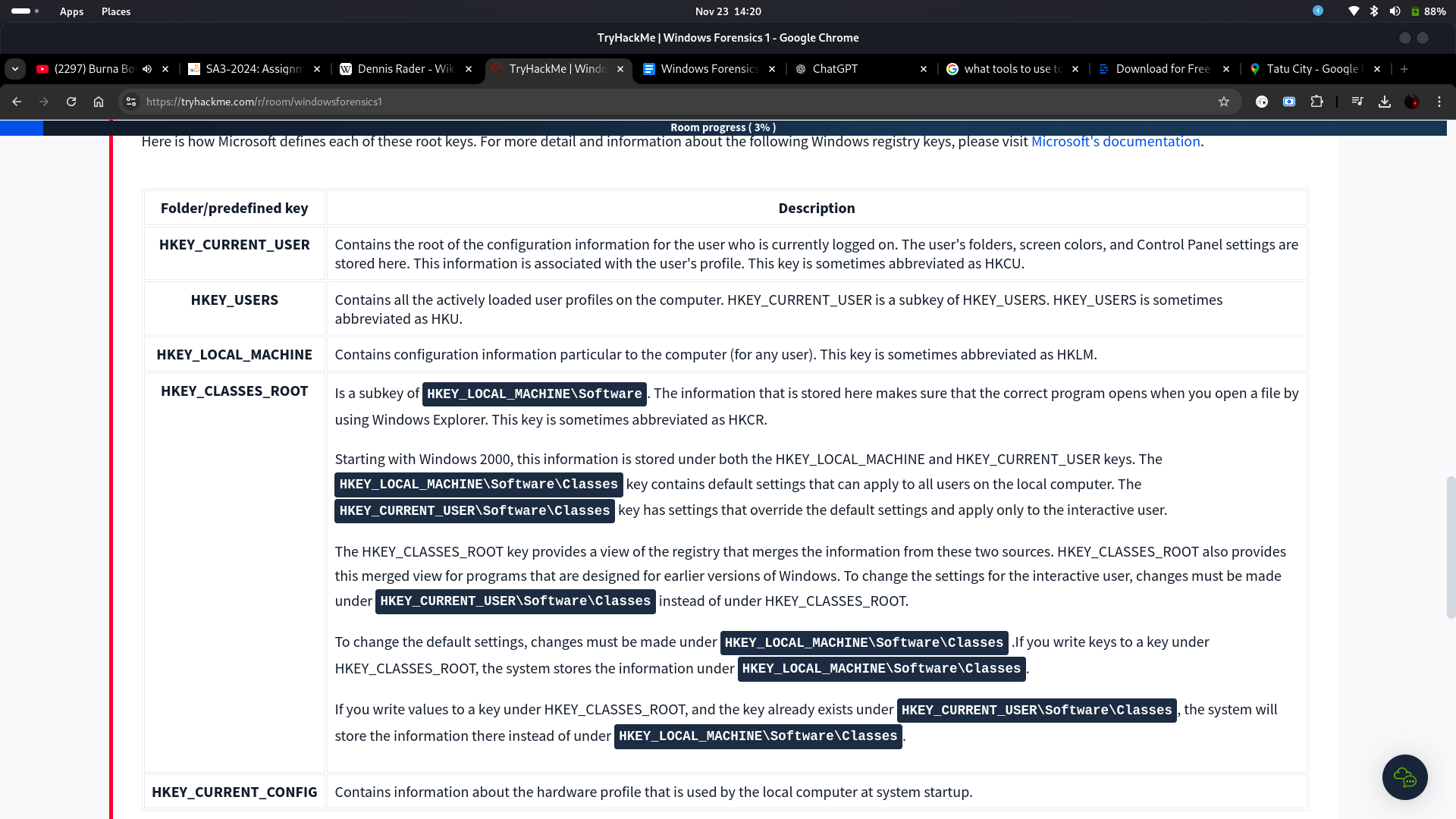
Here, I learned that the Windows Registry is a critical database for storing a system's configuration data, including details about hardware, software, user preferences, recently used files, and connected devices, making it highly valuable in forensics. The registry is organized into Keys and Values, with Keys acting as folders and Values holding the associated data. It is structured into five root keys: HKEY_CURRENT_USER, HKEY_USERS, HKEY_LOCAL_MACHINE, HKEY_CLASSES_ROOT, and HKEY_CURRENT_CONFIG, each serving distinct purposes. Using tools like regedit.exe, I can navigate, view, and edit these keys and values to extract forensic insights, such as user activity and system configurations.
Question:
- What is the short form for HKEY_LOCAL_MACHINE?
Answer: HKLM
Definitions for each of these root keys:
1.3 ACCESSING REGISTRY HIVES OFFLINE
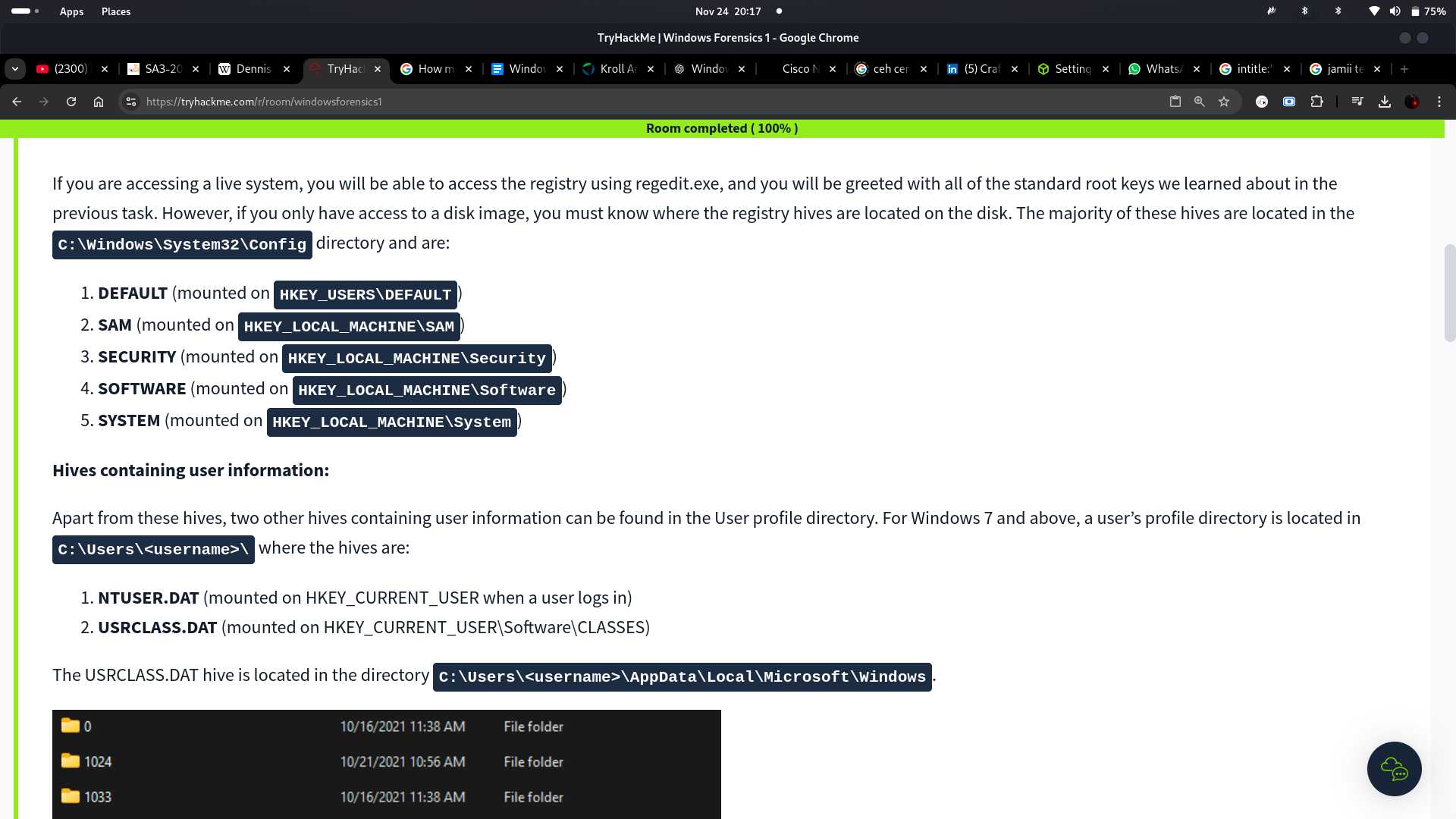
I learned that accessing registry hives offline is essential when analyzing disk images instead of live systems. The main hives are stored in the C:\Windows\System32\Config directory, including DEFAULT, SAM, SECURITY, SOFTWARE, and SYSTEM, each linked to specific registry root keys. User-related hives, NTUSER.DAT and USRCLASS.DAT, are found in a user's profile directory and store personalized settings and preferences. Additionally, the Amcache.hve hive, located at C:\Windows\AppCompat\Programs\Amcache.hve, records details about recently executed programs. Registry transaction logs (.LOG files) track changes to hives, while registry backups in the RegBack directory can help recover or analyze modified or deleted keys.
Questions:
- What is the path for the five main registry hives, DEFAULT, SAM, SECURITY, SOFTWARE, and SYSTEM?
Answer: C:\Windows\System32\Config
- What is the path for the AmCache hive?
Answer: C:\Windows\AppCompat\Programs\Amcache.hve
1.4 DATA ACQUISITION
I learned that data acquisition involves creating a copy of the system or required data for analysis to ensure accuracy and integrity. Registry hives cannot be directly copied from restricted directories like %WINDIR%\System32\Config, so specialized tools are used. Tools like KAPE allow live acquisition and analysis of registry data with both CLI and GUI interfaces. Autopsy and FTK Imager enable data extraction from live systems or disk images, with FTK Imager offering additional options like Obtain Protected Files for live systems, though it excludes files like Amcache.hve.
1.5 EXPLORING WINDOWS REGISTRY
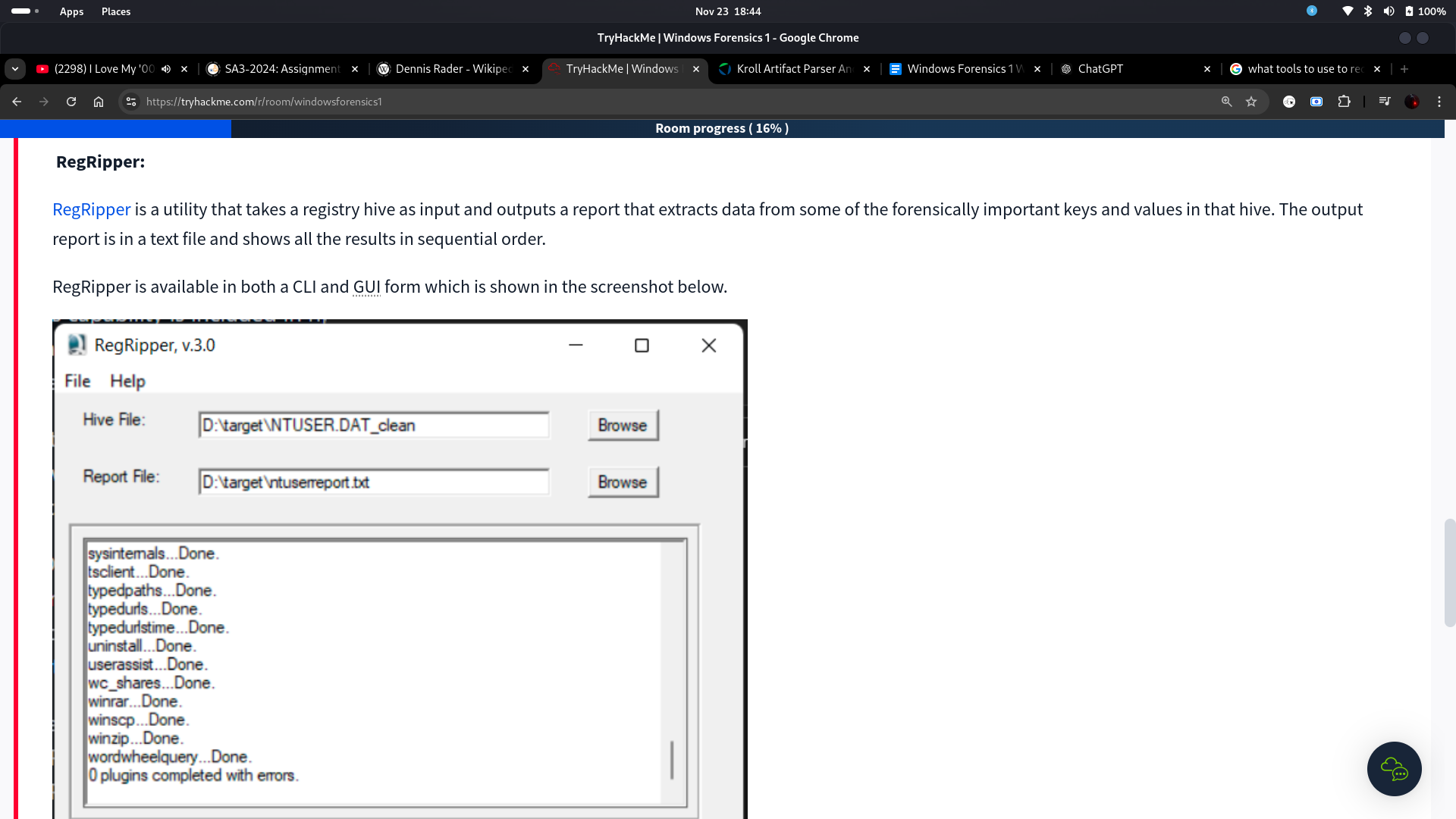
I learned that exploring Windows Registry requires specialized tools to analyze extracted registry hives, as the default registry editor cannot handle offline hives. Registry Viewer offers a familiar interface but can load only one hive at a time and ignores transaction logs. Zimmerman's Registry Explorer provides advanced features, such as merging transaction logs for more accurate data and bookmarks for quick access to critical registry keys. RegRipper generates reports by extracting data from important keys, but it doesn't process transaction logs, requiring tools like Registry Explorer for preprocessing.
RegRipper:
1.6 SYSTEM INFORMATION AND SYSTEM ACCOUNTS
Windows Registry provides crucial information for forensic analysis, such as the OS version located in SOFTWARE\Microsoft\Windows NT\CurrentVersion, control sets for system startup (SYSTEM\ControlSet001, SYSTEM\ControlSet002, and SYSTEM\Select), and the computer name under SYSTEM\CurrentControlSet\Control\ComputerName\ComputerName. Time zone details in SYSTEM\CurrentControlSet\Control\TimeZoneInformation are vital for accurate event timelines. Network interfaces and past network connections can be analyzed in SYSTEM\CurrentControlSet\Services\Tcpip\Parameters\Interfaces and SOFTWARE\Microsoft\Windows NT\CurrentVersion\NetworkList\Signatures. Autostart programs and services are found in various Run keys and SYSTEM\CurrentControlSet\Services. User account data, including login and group details, resides in the SAM hive under SAM\Domains\Account\Users.
Questions:
- What is the Current Build Number of the machine whose data is being investigated?
Answer: 19044
- Which ControlSet contains the last known good configuration?
Answer: 1
- What is the Computer Name of the computer?
Answer: THM-4n6
- What is the value of the TimeZoneKeyName?
Answer: Pakistan Standard Time
- What is the DHCP IP address
Answer: 192.168.100.58
- What is the RID of the Guest User account?
Answer: 501
1.7 USAGE OR KNOWLEDGE OF FILES/FOLDERS
Windows stores recently accessed files in the NTUSER.DAT\Software\Microsoft\Windows\CurrentVersion\Explorer\RecentDocs key, sorted by the most recently used (MRU) files. Microsoft Office maintains its recent files under NTUSER.DAT\Software\Microsoft\Office\VERSION. ShellBag data, stored in USRCLASS.DAT and NTUSER.DAT, reveals folder layout preferences and most recently used folders. The Open/Save and LastVisited Dialog MRU keys in NTUSER.DAT\Software\Microsoft\Windows\CurrentVersion\Explorer\ComDlg32 provide insights into recently opened or saved file locations. Additionally, paths typed in the Explorer address bar or searches performed are captured in the TypedPaths and WordWheelQuery keys, respectively. These keys offer valuable evidence of user activity and file access timelines.
Questions:
- When was EZtools opened?
Answer: 2021-12-01 13:00:34
- At what time was My Computer last interacted with?
Answer: 2021-12-01 13:06:47
- What is the Absolute Path of the file opened using notepad.exe?
Answer: C:\Program Files\Amazon\Ec2ConfigService\Settings
- When was this file opened?
Answer: 2021-11-30 10:56:19
1.8 EVIDENCE OF EXECUTION
The UserAssist key, found in NTUSER.DAT\Software\Microsoft\Windows\CurrentVersion\Explorer\UserAssist\\Count, records information about applications launched via Windows Explorer, including execution counts and timestamps. The ShimCache (or Application Compatibility Cache), located at SYSTEM\CurrentControlSet\Control\Session Manager\AppCompatCache, tracks executed applications, storing details like file name, size, and last modified time. For better parsing, tools like Eric Zimmerman's AppCompatCache Parser are used. The AmCache hive provides additional execution metadata, such as installation and deletion times and SHA1 hashes. Lastly, BAM/DAM keys in SYSTEM\CurrentControlSet\Services\bam\UserSettings\ and dam\UserSettings\ log background and desktop application activity, including last execution times and file paths.
Questions:
- How many times was the File Explorer launched?
Answer: 6
- What is another name for ShimCache?
Answer: AppCompatCache
- Which of the artifacts also saves SHA1 hashes of the executed programs?
Answer: AmCache
- Which of the artifacts saves the full path of the executed programs?
Answer: BAM/DAM
1.9 EXTERNAL DEVICES/USB DEVICE FORENSICS
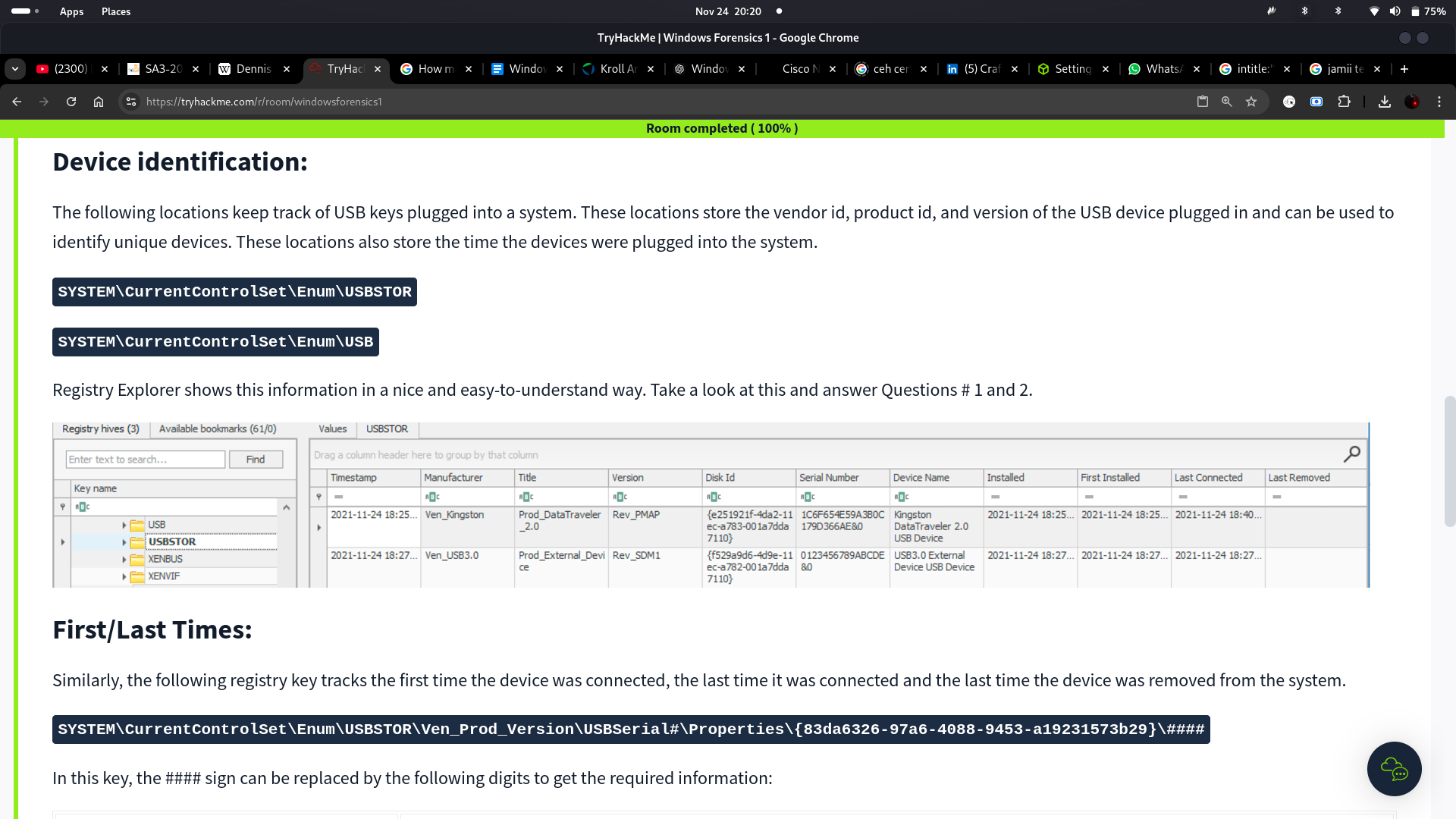
The USB device identification information is stored in SYSTEM\CurrentControlSet\Enum\USB and USBSTOR, which record details such as vendor ID, product ID, and device version. These keys also track unique devices and their connection events.
The first connection, last connection, and last removal times for USB devices are found in SYSTEM\CurrentControlSet\Enum\USBSTOR\Ven_Prod_Version\USBSerial#\Properties\\####, with specific codes (e.g., 0064 for the first connection) parsed efficiently using tools like Registry Explorer.
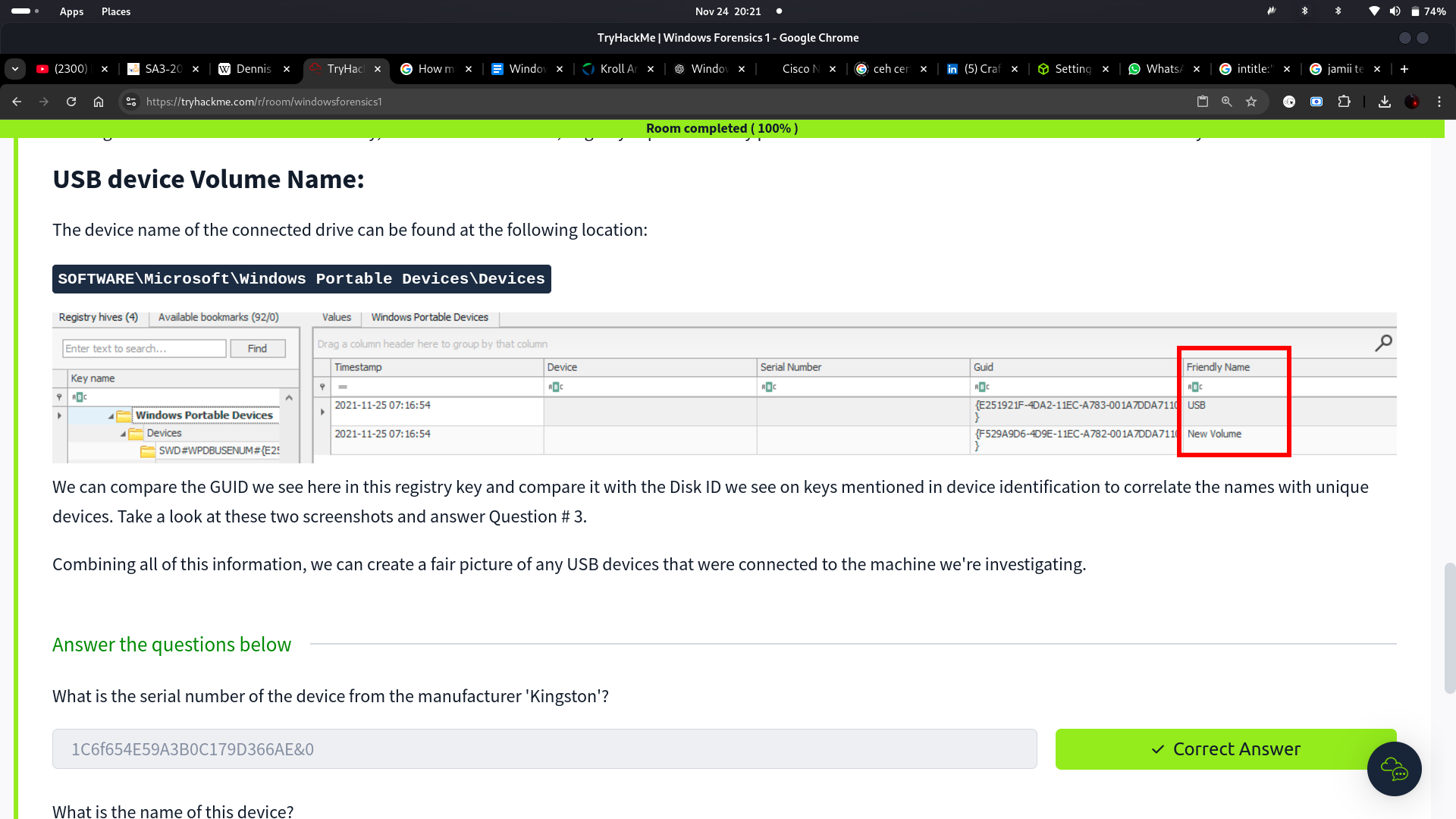
Additionally, the USB device volume name can be identified at SOFTWARE\Microsoft\Windows Portable Devices\Devices, where GUIDs are matched with disk IDs to correlate device names to unique devices. This comprehensive registry data enables investigators to reconstruct USB activity on a system.
Questions:
- What is the serial number of the device from the manufacturer 'Kingston'?
Answer: 1C6f654E59A3B0C179D366AE&0
- What is the name of this device?
Answer: Kingston Data Traveler 2.0 USB Device
- What is the friendly name of the device from the manufacturer 'Kingston'?
Answer: USB
Device identification:
Friendly name:
1.10 HANDS-ON CHALLENGE
Scenario:
One of the Desktops in the research lab at Organization X is suspected to have been accessed by someone unauthorized. Although they generally have only one user account per Desktop, there were multiple user accounts observed on this system. It is also suspected that the system was connected to some network drive, and a USB device was connected to the system. The triage data from the system was collected and placed on the attached VM. Can you help Organization X with finding answers to the below questions?
Note: When loading registry hives in RegistryExplorer, it will caution us that the hives are dirty. This is nothing to be afraid of. We just need to remember the little lesson about transaction logs and point RegistryExplorer to the .LOG1 and .LOG2 files with the same filename as the registry hive. It will automatically integrate the transaction logs and create a 'clean' hive. Once we tell RegistryExplorer where to save the clean hive, we can use that for our analysis and we won't need to load the dirty hives anymore. RegistryExplorer will guide you through this process.
Questions:
-
How many user created accounts are present on the system?
-
What is the username of the account that has never been logged in?
-
What's the password hint for the user THM-4n6?
-
When was the file 'Changelog.txt' accessed?
-
What is the complete path from where the python 3.8.2 installer was run?
-
When was the USB device with the friendly name 'USB' last connected?
Explanation:
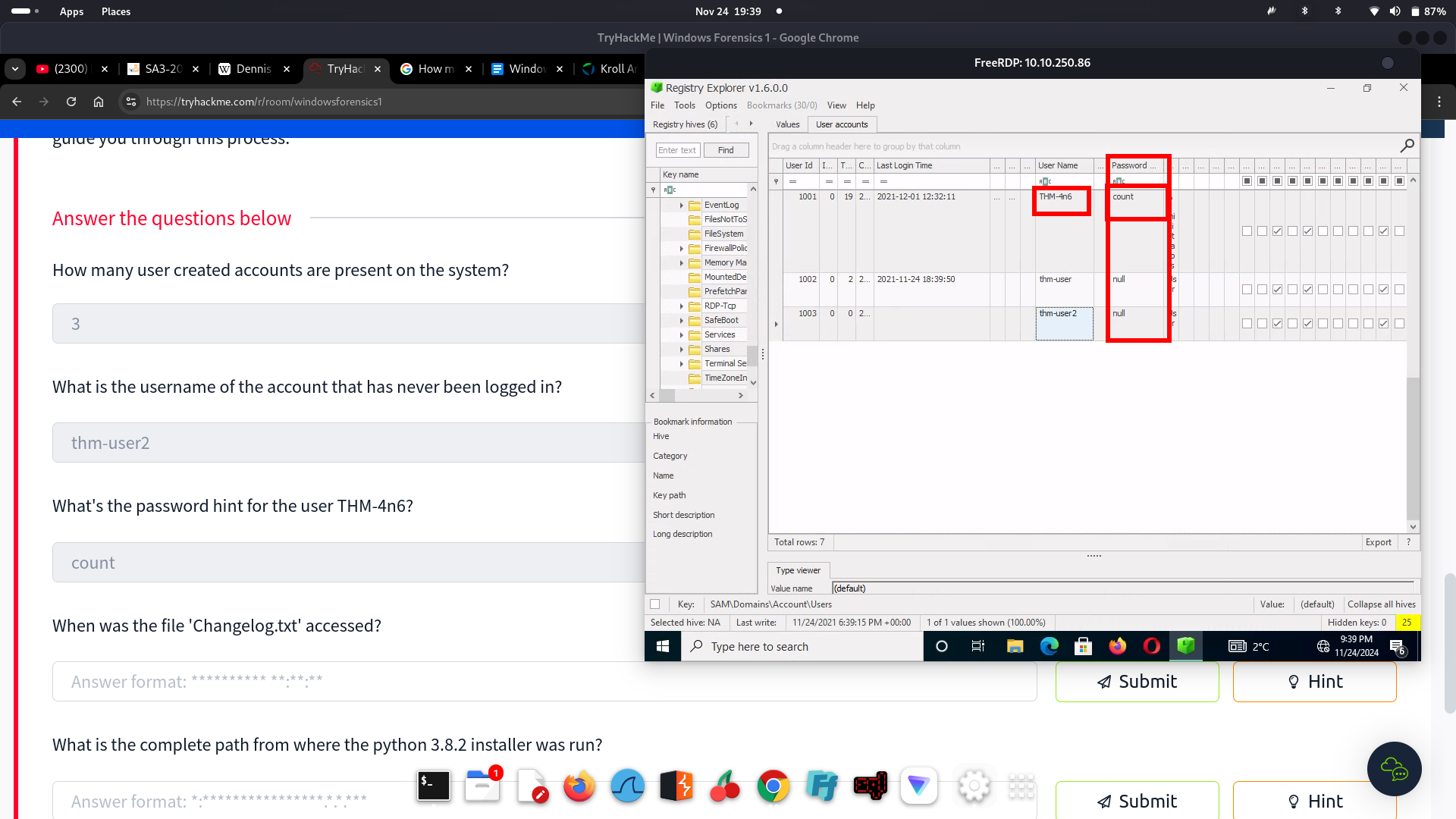
I did a RDP into the machine. Located the EZTools folder then opened the RegistryExplorer and loaded the hives needed.
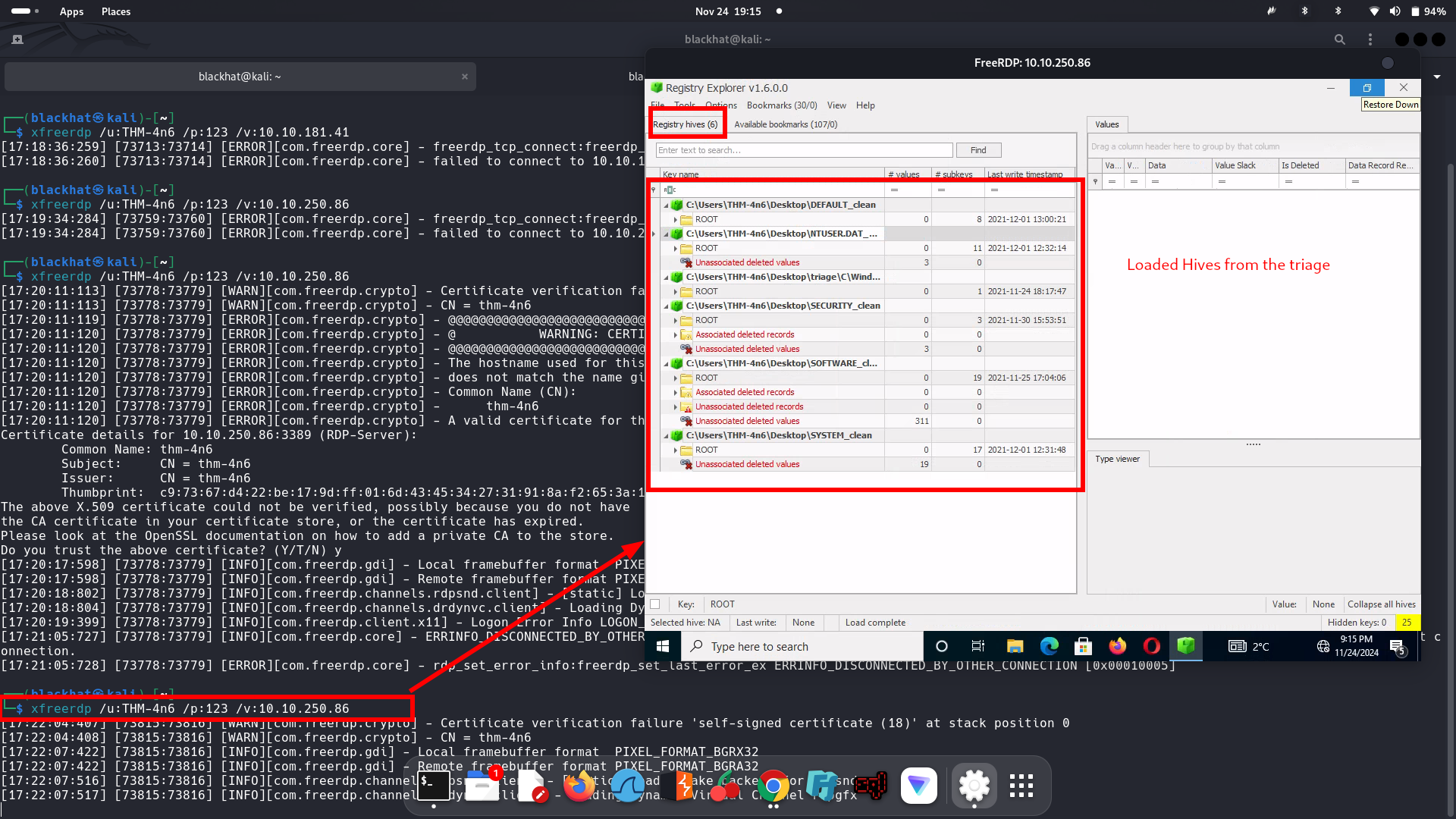
**Question 1: Hint:**Accounts with RIDs starting with 10xx are user created accounts
Answer: 3
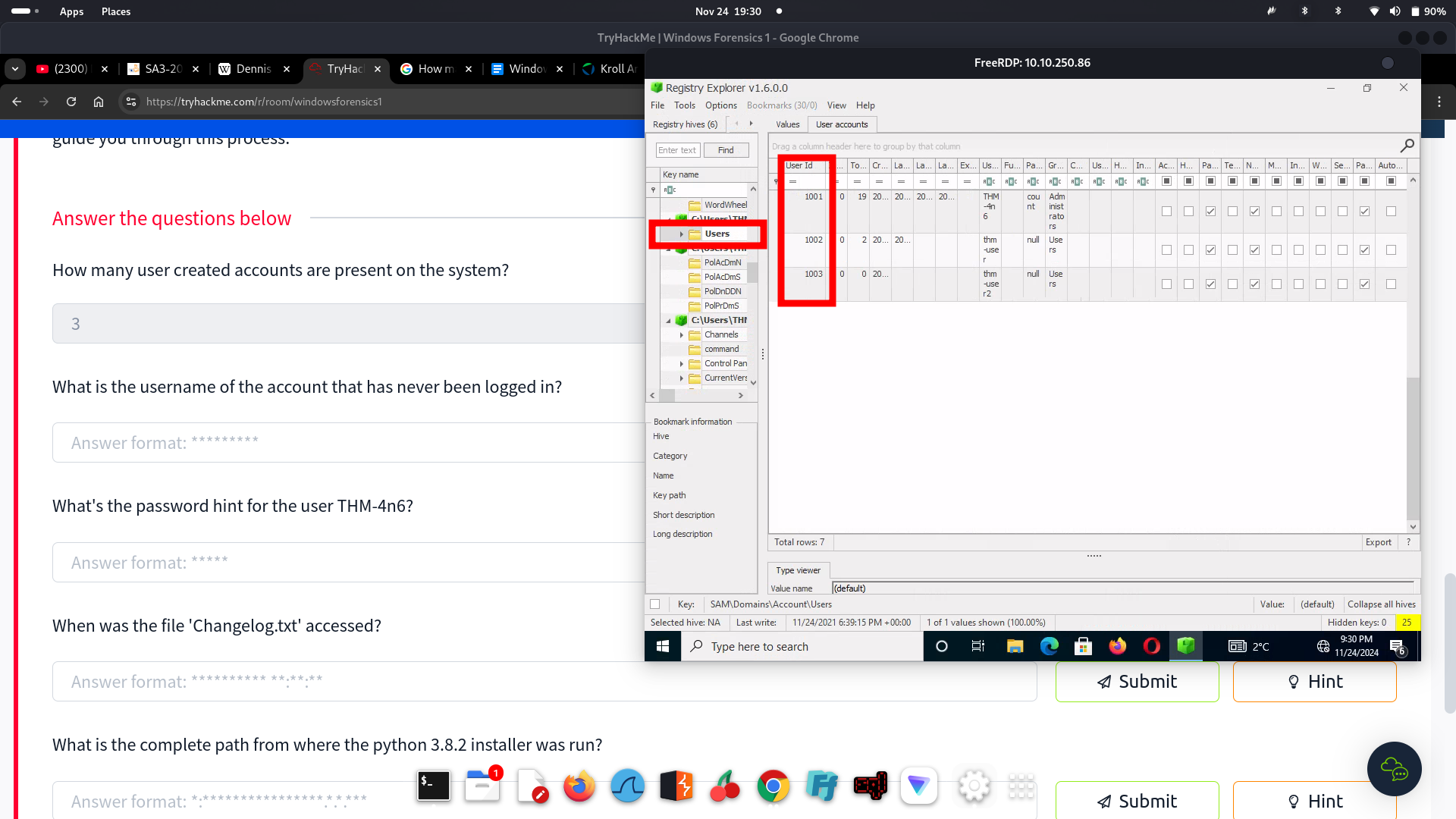
Question 2: Hint: Check the account that does not have a last logged in time
Answer: thm-user2
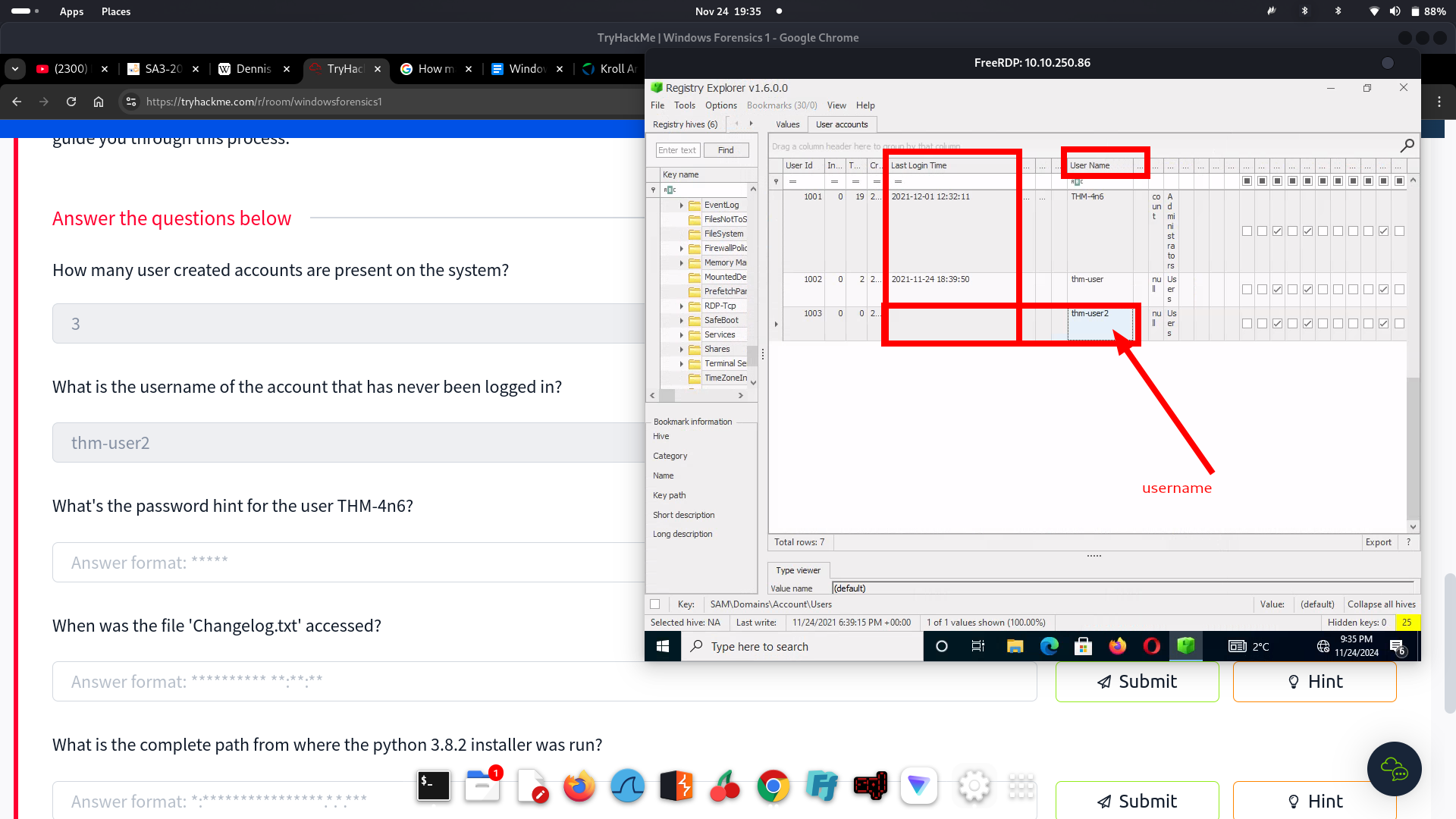
Question 3: Hint: Check the Password Hint column
Answer: Count
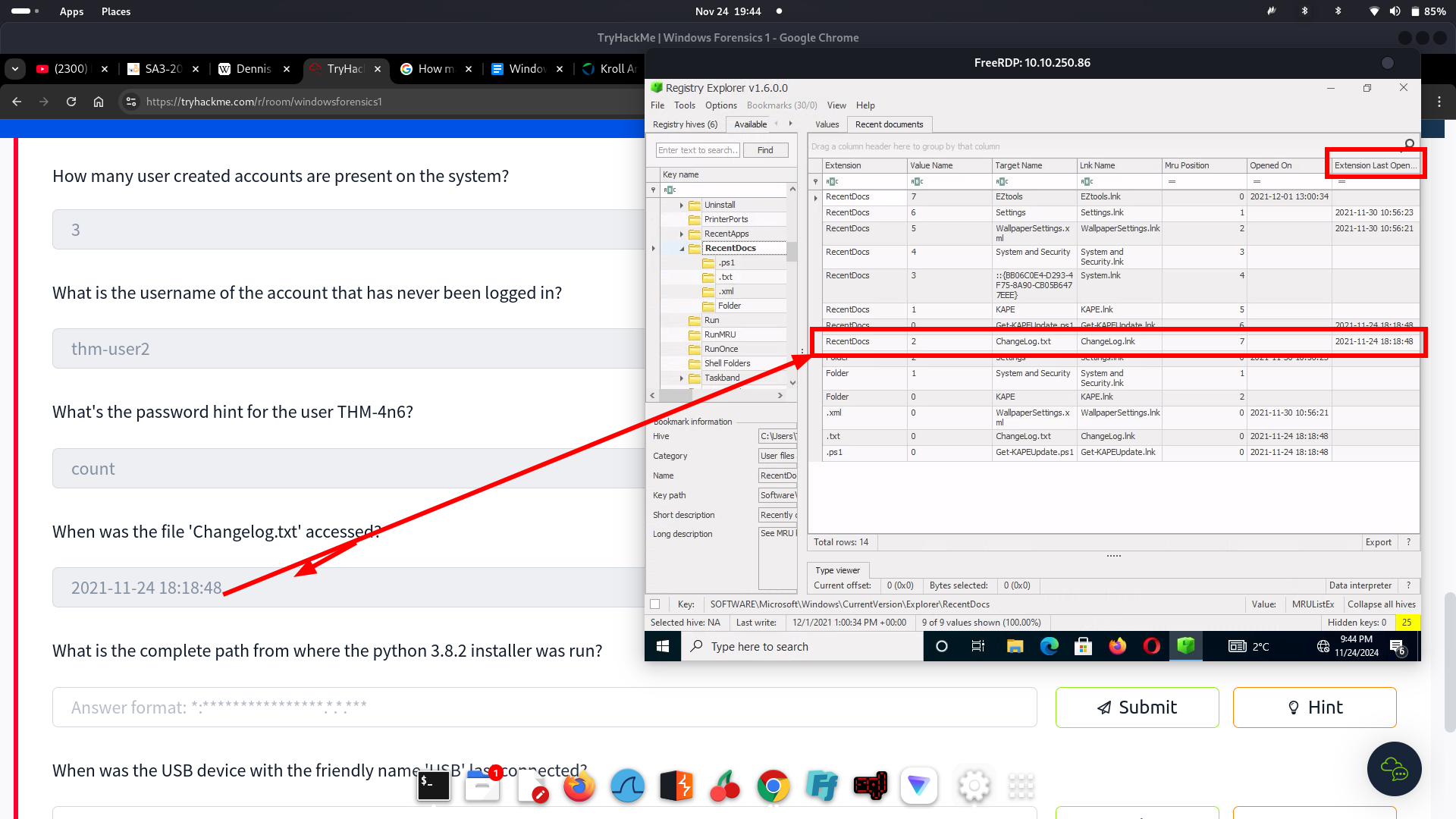
Question 4: RecentDoc
Answer: 2021-11-24 18:18:48
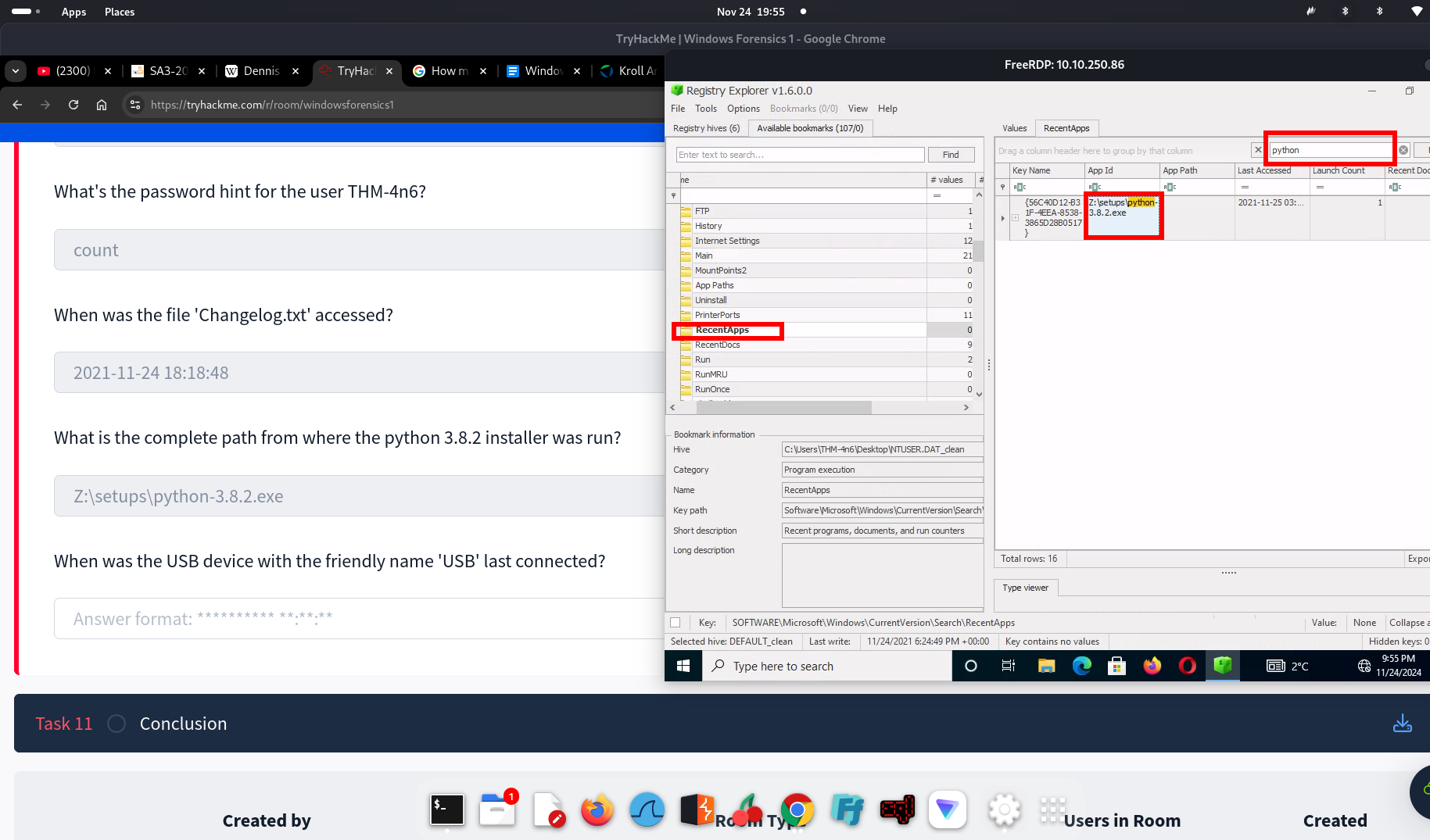
Question 5: Made use of the search
Answer: Z:\setups\python-3.8.2.exe
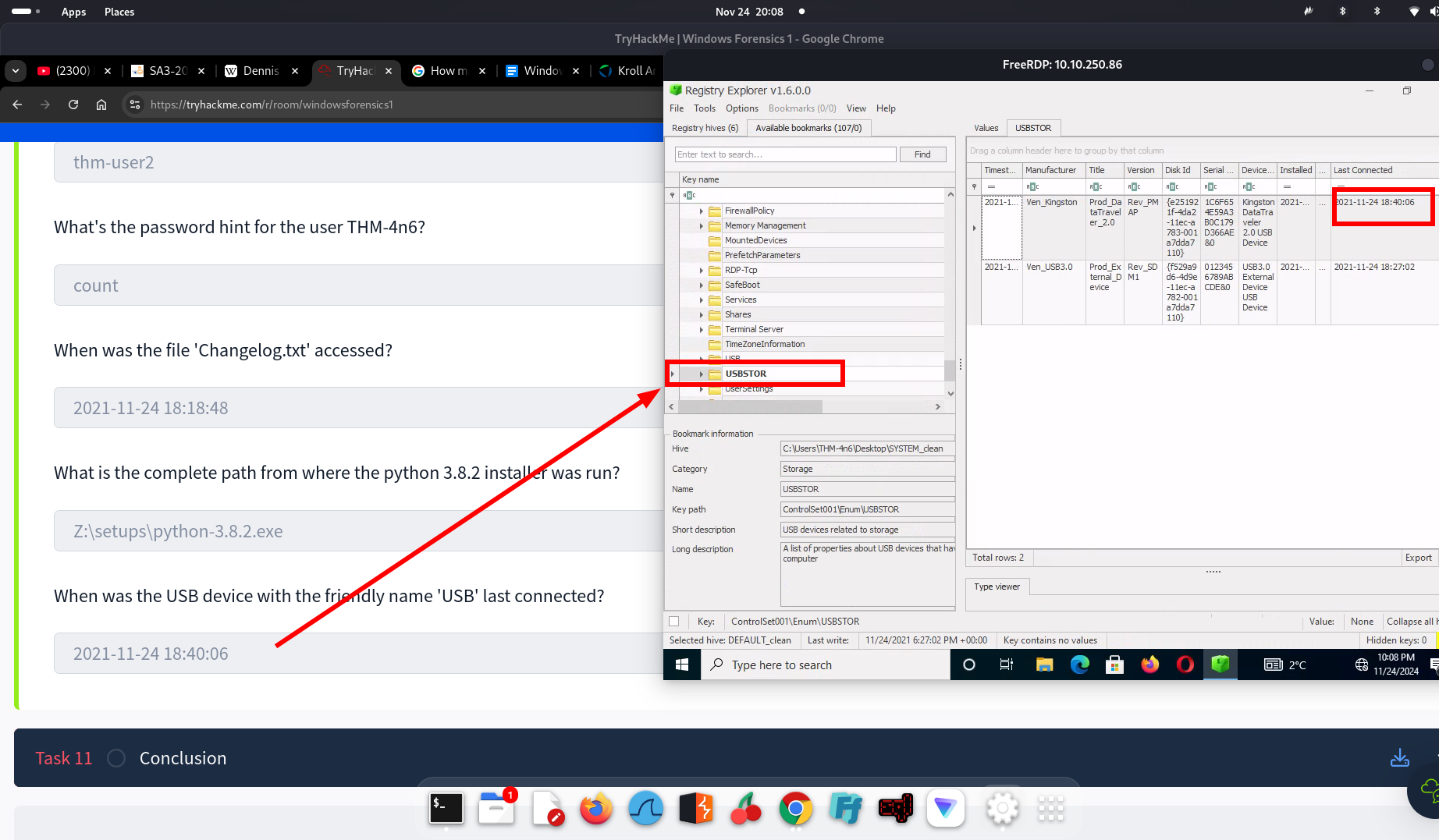
Question 6:
Answer: 2021-11-24 18:40:06
1.11 CONCLUSION
This module was the perfect level of challenge for me. While I've used tools like Autopsy before, Registry Explorer was new to me, and I enjoyed learning how to navigate and load files into it. The hands-on experience of exploring registry data felt like solving a digital puzzle, which I found both engaging and insightful. I've saved the cheat sheet for future reference, as it's a valuable resource. Overall, this was a rewarding experience, and I'm excited to tackle the next room which is the windows forensic 2!
Completion Screenshot: